

Confused about citation format right before submitting your academic paper? You’re not alone. Every year, thousands of students and researchers scramble through the final hours before a deadline trying to figure out whether a period goes before or after a parenthetical citation, how to format a DOI, or whether a Reference List and a Bibliography are even the same thing. It’s a genuinely stressful experience — and getting it wrong carries real consequences. Grade deductions, rejected journal manuscripts, and damaged academic credibility are all on the table when citations are inconsistent, incomplete, or formatted incorrectly. Professors notice. Peer reviewers notice. And plagiarism prevention software flags improperly attributed sources whether the oversight was intentional or not.
APA Style is the most widely used citation and formatting system across psychology, education, nursing, and the social sciences — and for good reason. It creates a standardized way for researchers to credit sources, build on each other’s work, and give readers a clear path back to original material. This guide covers everything from your very first In-Text Citation to structuring a complete paper with a Title Page, Abstract, and Reference Page — so you can stop searching and start writing with confidence.
Quick answer: APA (American Psychological Association) Style is a set of rules for formatting academic papers and citing sources. The current version, APA 7th Edition, is documented in the Publication Manual of the American Psychological Association and governs how writers reference everything from a Journal Article Citation to a website URL, thesis, or ISBN-identified book.
What is APA Style? A clear, direct overview.
APA Style is a standardized system of citation and document formatting developed by the American Psychological Association. It was first published in 1929 as a brief journal article outlining editorial guidelines, and it has since grown into the comprehensive Publication Manual of the American Psychological Association, now in its 7th Edition (published 2020). The system is built around two core components: In-Text Citations that appear within the body of a paper, and a Reference List at the end that provides full source details — including the DOI (Digital Object Identifier) for digital publications where available. APA’s structured approach to Academic Writing exists to ensure consistency across disciplines, protect source credibility, and support Plagiarism Prevention by making attribution clear and verifiable. Whether you’re citing a journal article, a webpage identified by URL, or a dissertation via Thesis Citation, APA gives every source a defined format that readers and reviewers can trust.
What Is APA Style and Why Is It Important in Academic Writing?
APA Style is a set of rules for writing and formatting academic documents. It was created by the American Psychological Association and first published in 1929 as a short journal article. Today, the Publication Manual of the American Psychological Association — now in its seventh edition — runs over 400 pages and covers everything from punctuation to how you cite a TikTok video.
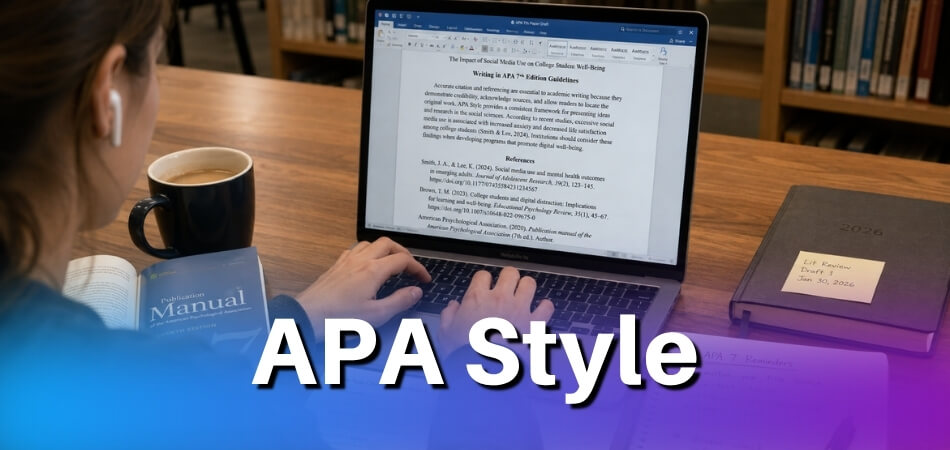
The short version: APA Style tells you how to present information so that readers can trust it, trace it, and evaluate it themselves.
APA 7th Edition is the current standard. It replaced the 6th edition in 2019, and the differences matter. Running references or paper structure rules from the old edition will get you marked down in most academic institutions today.
Who Actually Uses APA?
Primarily researchers and students in psychology, education, nursing, sociology, and the social sciences. It’s not universal — historians use Chicago, literary scholars use MLA — but if your field deals with human behavior, health, or social research, you’re almost certainly writing in APA.
That said, many interdisciplinary fields have adopted it too. Business schools, communication departments, criminology programs — the reach is wider than the name suggests.
What the Style Actually Covers
People often think APA is just about citations. It’s not. The style governs:
- Document structure — your Title Page, Abstract, body, and Reference Page all follow specific formatting rules
- In-Text Citation — every source you mention in the body needs a corresponding parenthetical reference
- Reference List — the full source details at the end of the document, formatted precisely by source type
- Language and tone — APA has guidelines on bias-free language, verb tense, and even how to write numbers
The Reference List and a Bibliography are not the same thing. A Reference List includes only the sources you actually cited in your text. A Bibliography can include background reading you never directly cited. APA uses Reference Lists, not bibliographies.
Why It Matters Beyond Formatting
The practical reason APA exists is Plagiarism Prevention. When every source is cited — with a DOI (Digital Object Identifier), URL, ISBN, or enough publication detail for someone to find it — you’re giving credit where it’s due and making your work verifiable.
But there’s a second reason. Consistency. When a reviewer picks up a psychology paper from Brazil and one from Canada, both formatted in APA, they can find the information they need without relearning the structure each time. That standardization speeds up peer review, makes meta-analyses possible, and reduces misunderstandings about what evidence is being cited.
Academic Writing without consistent citation is harder to evaluate and easier to manipulate. APA removes that ambiguity.
The Role of APA Citation Generators
Tools marketed as an APA Citation Generator can help you format individual references quickly — especially for source types like a Journal Article Citation, Thesis Citation, or a webpage with a complicated URL. They’re useful for speed, not for accuracy guarantees. Always check the output against the actual APA 7th Edition rules. Generators make mistakes, particularly with unusual source types or missing metadata.
If you’re serious about getting citations right, keep the Publication Manual nearby. The generator is a starting point, not a final answer.
Core Elements of APA Citation
Before you write a single reference, you need to understand how the pieces fit together. APA Style has two moving parts that work as a team: the brief citation you drop into your text, and the full reference entry waiting at the end of your document. Get both right, and your paper is solid. Miss one, and the whole system breaks down.
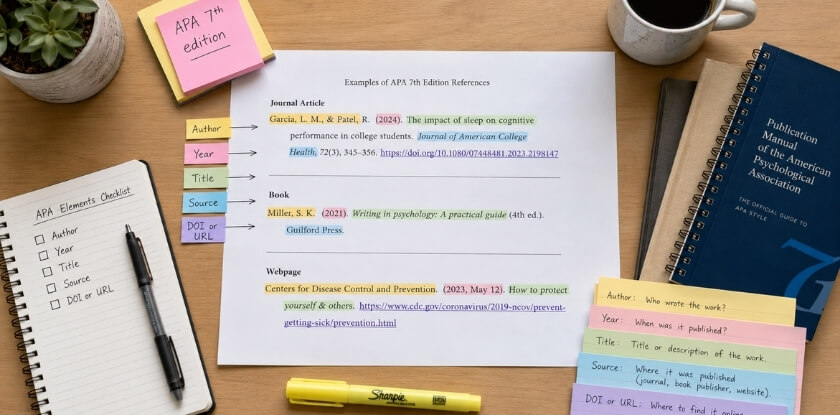
In-Text Citation
An in-text citation is the short pointer you place inside your writing — right after a quote, a paraphrase, or any borrowed idea. Its job is simple: tell the reader exactly who said it and when.
The basic APA 7th Edition format is (Author, Year). That’s it.
If you’re quoting directly, add a page number: (Smith, 2021, p. 45). For a paraphrase, the page number is optional but encouraged when it helps the reader find the original passage quickly.
A few situations that trip people up:
- Two authors: List both every time — (Garcia & Lee, 2020)
- Three or more authors: Use the first author’s name followed by et al. from the very first citation — (Patel et al., 2019)
- No author: Use a shortened version of the title in quotation marks — (\”Writing Well,\” 2022)
- No date: Use n.d. in place of the year — (Johnson, n.d.)
One thing people miss: the in-text citation must match an entry in your Reference List. Exactly. Same author spelling, same year. If there’s a citation in your text with no matching reference entry, that’s a red flag for plagiarism — the Publication Manual of the American Psychological Association is explicit about this.
Reference List
The Reference List is the full record of every source you actually cited. It lives on its own page at the end of your document, titled References — centered, bold, no italics, no quotation marks around it.
Every entry follows the same core pattern:
Author, A. A. (Year). Title of work. Publisher. DOI or URL
The specifics shift depending on source type. A Journal Article Citation looks like this:
Brown, T. R., & Kim, S. (2022). Cognitive load in remote learning environments. Journal of Educational Psychology, 114(3), 601–618. https://doi.org/10.1037/edu0000123
Notice the DOI (Digital Object Identifier) at the end. Always include it when available — APA 7th Edition made this a firm expectation, not a courtesy. If there’s no DOI, use a URL. If neither exists (a print-only book, for example), just end after the publisher.
For books, include the ISBN only if your instructor specifically requires it. APA itself doesn’t mandate it.
A Thesis Citation follows a slightly different structure — you’d note the institution and the database it’s retrieved from.
Formatting rules for the Reference List:
- Entries are in alphabetical order by the first author’s last name
- Use a hanging indent — first line flush left, subsequent lines indented 0.5 inches
- Double-space everything, no extra space between entries
- The Reference Page is separate from the body of the paper; it starts on a new page
An APA Citation Generator can save time building these entries, but always double-check the output. Most generators get the big things right and fumble the small ones — a missing DOI, an extra comma, an author’s initials in the wrong order.
Bibliography vs. Reference List — What Is the Difference?
People use these two words interchangeably. They shouldn’t.
A Reference List includes only the sources you cited in your paper. One-to-one correspondence between in-text citations and entries.
A Bibliography includes every source you consulted while writing — even ones you read for background and never directly cited. Some disciplines and style guides use bibliographies routinely. APA does not. The Publication Manual of the American Psychological Association is clear: use a Reference List, not a bibliography, unless an instructor explicitly asks for one.
Why does it matter? Academic Writing under APA Style is built around traceability. Every in-text citation should be traceable to a specific reference entry. A bibliography muddies that chain because it includes sources with no corresponding citations in the text.
Short version: if you’re writing in APA Style, you have a Reference List. Full stop.
Rules for Creating Citations in APA 7th Edition
APA 7th Edition brought some real changes from the 6th. If you’ve been citing sources for a while, a few things will look different. If you’re starting fresh, you’re actually in a better position — you’re learning the current rules, not the old ones.
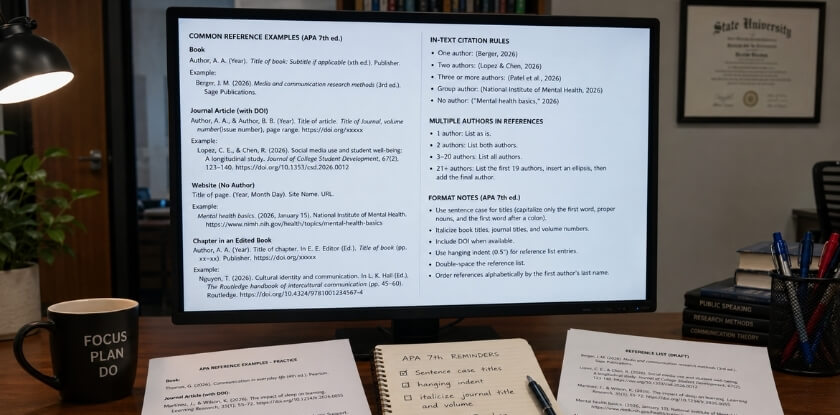
Here’s how to handle the four source types you’ll run into most.
Journal Article Citation
This is probably the most common citation type in academic writing. The basic format looks like this:
Author, A. A., & Author, B. B. (Year). Title of article. Journal Name, Volume(Issue), Page–Page. https://doi.org/xxxxx
A few things to know:
Only the first word of the article title gets capitalized — plus any proper nouns and the first word after a colon. The journal name, though, stays in title case. That distinction trips people up constantly.
The DOI (Digital Object Identifier) is your first choice for linking. If there’s a DOI, use it. Skip the URL. If there’s no DOI and you accessed the article online, then include the URL of the journal’s homepage — not the database URL.
Real example:
Garner, R. L., & Torres, M. (2021). Attention and retention in blended learning environments. Journal of Educational Psychology, 113(4), 789–802. https://doi.org/10.1037/edu0000592
No DOI? No database URL needed if the article is from an academic database like PsycINFO or EBSCO. That’s a 7th Edition update — the old rule required the database URL. It doesn’t anymore.
Book Citation (Including ISBN)
The format for a whole book:
Author, A. A. (Year). Title of book: Subtitle if any (Edition, if not first). Publisher.
You don’t include the ISBN in an APA reference. That surprises people. APA style doesn’t use ISBN in the Reference List, even though ISBN uniquely identifies a book. The citation relies on author, year, title, and publisher instead.
If you’re citing a specific edition:
Creswell, J. W., & Creswell, J. D. (2018). Research design: Qualitative, quantitative, and mixed methods approaches (5th ed.). SAGE Publications.
For an edited book, the editor(s) go in the author position with “(Ed.)” or “(Eds.)” after the name:
Cooper, H. (Ed.). (2012). APA handbook of research methods in psychology. American Psychological Association.
Chapters in edited books get their own format — you cite the chapter author first, not the book editor. The editor’s name moves to the middle of the citation with “In” before it.
Snyder, C. R. (2000). The past and possible futures of hope. In J. E. Gillham (Ed.), The science of optimism and hope (pp. 25–51). Templeton Foundation Press.
Website and Online Source Citation (Including URL)
Websites are where citations get messy fast. The format:
Author, A. A. (Year, Month Day). Title of page or document. Site Name. URL
If there’s no author, the site name moves to the author position. If there’s no date, write “(n.d.)” where the year goes.
Centers for Disease Control and Prevention. (2023, October 5). Vaccine safety: Overview. https://www.cdc.gov/vaccinesafety/index.html
A few rules that catch people off guard:
Don’t include “Retrieved from” before URLs anymore — that was 6th Edition. In APA 7th Edition, you just put the URL directly. No period after the URL at the end of a citation. Periods end sentences, but a period at the end of a URL can confuse readers into thinking it’s part of the address.
For social media posts, the format is similar. The post’s first 20 words or so act as the title, in italics. Platform name goes where “site name” would.
Retrieval dates are only needed when the content genuinely changes over time and there’s no archived version — like a live statistics page or a wiki. For most standard web pages, you don’t need a retrieval date in APA 7th Edition.
Academic Paper and Thesis Citation
Unpublished theses, published dissertations, and papers from databases all follow slightly different paths.
Unpublished thesis or dissertation:
Lim, S. (2020). Cognitive load and multimedia instruction in secondary classrooms [Unpublished doctoral dissertation]. University of Toronto.
Published in a database (like ProQuest):
Hernandez, C. (2019). Social capital and immigrant integration in urban schools [Doctoral dissertation, Columbia University]. ProQuest Dissertations & Theses Global. https://www.proquest.com/docview/2387645923
The difference matters. If it’s published — meaning publicly accessible through a database or institutional repository — include the database name and URL. If it sits in a university archive and was never formally published, label it “Unpublished” and name the institution.
For conference papers, you treat them more like journal articles if they’re in published proceedings. If it was a presentation only, note that in brackets.
Kim, J., & Park, H. (2022, March 15–19). Teacher feedback and self-regulated learning in online courses [Paper presentation]. American Educational Research Association Annual Meeting, San Diego, CA.
One thing the Publication Manual of the American Psychological Association makes clear: if you can’t identify a stable, findable source, cite the most direct version you actually used — not a secondary reference to it. Tracing sources back to their origin isn’t just good citation practice. It’s part of Plagiarism Prevention in academic work, and reviewers notice when citations don’t hold up.
If you’re building a Reference List and find yourself unsure about any of these formats, an APA Citation Generator can help you draft entries — but always cross-check the output against the 7th Edition manual. Generators get details wrong, especially with DOIs, edition numbers, and chapter citations.
Paper Structure in APA Format
Getting the structure right matters as much as the citations themselves. APA Style has specific expectations for how your paper is organized — not just what’s in it, but where each part goes and how it looks on the page. Here’s what you need to know for each section.
Title Page
Every APA 7th Edition paper starts with a title page. What goes on it depends on whether you’re writing a student paper or a professional one (for submission to a journal).
For a student paper, you need:
- The full title of your paper (bold, centered, in the upper half of the page)
- Your name
- Your institution (the school or department)
- Course number and name
- Instructor’s name
- Assignment due date
- Page number (top right header)
Professional papers swap the course info for an author note and a running head — a shortened version of the title that appears in the header of every page, all caps, no more than 50 characters.
The title itself should be specific and informative. Something like Effects of Sleep Deprivation on Short-Term Memory in College Students works. “Memory Study” does not. APA recommends keeping titles under 12 words, though there’s no hard rule.
Abstract
Not every paper needs an abstract. Your instructor will usually tell you if one is required. But if it is, this section comes right after the title page on its own page.
The abstract is a single paragraph — no indent — that summarizes your paper in 150 to 250 words. That’s the range the Publication Manual of the American Psychological Association specifies, and most journals enforce it strictly.
What belongs in an abstract: the research problem, your methods, key findings, and the conclusion. That’s it. No citations, no direct quotes, no padding. Write it last, even though it appears first.
Under the abstract, you can include keywords. Type the word Keywords: in italics, indent it, and list 3–5 lowercase terms separated by commas. Keywords help with database searches and are especially relevant if you’re submitting to a journal.
Body and Headings
APA papers use a five-level heading system. Most undergraduate papers only use two or three levels.
| Level | Format |
|---|---|
| 1 | Bold, centered, title case |
| 2 | Bold, left-aligned, title case |
| 3 | Bold, italic, left-aligned, title case |
| 4 | Bold, italic, indented, title case, ends with period |
| 5 | Italic, indented, title case, ends with period |
You don’t label headings “Section 1” or “Introduction” in most student papers — you just use your actual section titles. The word Introduction is technically never used as a heading in APA format because APA assumes the first section is the introduction by default.
Paragraphs are indented half an inch. The body text is double-spaced throughout, with no extra spacing between paragraphs. Use a readable 12-point font — Times New Roman is the classic choice, but APA 7th Edition also accepts Calibri 11pt, Arial 11pt, and a few others.
Keep your In-Text Citation accurate throughout the body. Every fact, quote, or idea you pull from another source needs one. No exceptions.
Reference Page
The Reference Page is its own page at the end of your paper. Centered, bold heading at the top: References. That’s it — no “Bibliography,” no “Works Cited.” Those belong to other citation styles.
A few non-negotiable rules:
- Alphabetical order by the first author’s last name
- Hanging indent format: first line flush left, every subsequent line indented 0.5 inches
- Double-spaced with no extra lines between entries
- Every in-text citation you used must have a matching entry here. Every entry here must appear somewhere in your text.
For a Journal Article Citation, you need: author(s), year, article title, journal name (italicized), volume (italicized), issue number (in parentheses, not italicized), page range, and the DOI (Digital Object Identifier) if one exists. The DOI looks like a URL and makes your source permanently traceable — always include it when it’s available.
For books, include the ISBN only if your institution specifically requires it; APA style itself doesn’t mandate it. For websites, include the full URL and the date you accessed the page if the content is likely to change.
If you’re citing a Thesis Citation, the format follows a similar pattern but includes the institution name and the database where it’s archived (like ProQuest).
A lot of students use an APA Citation Generator to build their reference list. That’s fine as a starting point, but always check the output manually. Generators get volume and issue numbers wrong, mess up DOIs, and sometimes drop author initials. Treat the output as a draft, not a final product.
Common APA Formatting Mistakes and How to Avoid Them
Even experienced researchers mess up APA format regularly. The rules are detailed, and the 7th Edition of the Publication Manual of the American Psychological Association introduced enough changes from the 6th that old habits keep resurfacing. Here’s what actually goes wrong most often — and exactly how to fix it.
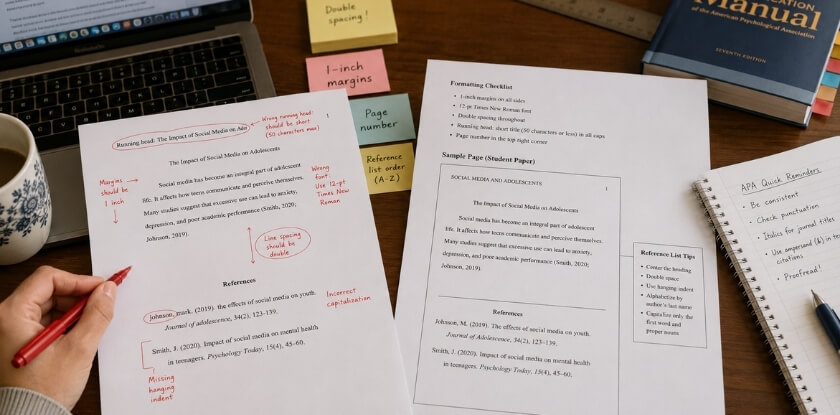
Hanging Indents Done Wrong
This is probably the single most common error on a Reference Page. Every reference entry needs a hanging indent: the first line is flush left, and every subsequent line is indented 0.5 inches. People frequently do it backwards — indenting the first line like a paragraph — or they use the space bar instead of the actual indent function.
In Microsoft Word, select your reference list, go to Paragraph settings, and under “Special” choose “Hanging” with a value of 0.5″. Don’t fake it with spaces. It’ll look fine on screen and break the moment someone opens your file on a different machine.
Mixing Up the Reference List and Bibliography
These two terms are not interchangeable in APA Style. A Reference List contains only the sources you actually cited in your paper. A Bibliography includes sources you consulted but may not have cited directly. APA uses a Reference List. Full stop. Calling it a Bibliography in your paper isn’t just semantically wrong — some instructors will mark it down.
In-Text Citation Errors
The author-date format sounds simple until you hit edge cases. A few that trip people up constantly:
Multiple authors. For a work with three or more authors, APA 7th Edition uses “et al.” from the very first citation. So it’s (Jones et al., 2021), not (Jones, Smith, & Brown, 2021). This is a change from the 6th Edition, and a lot of older guides still show the old way.
Same author, same year. If you’re citing two papers by the same author published in the same year, you add lowercase letters: (Martinez, 2022a) and (Martinez, 2022b). Those same letters go in your Reference List entries.
Quotations. Direct quotes require a page number or paragraph number. Writing (Thompson, 2020) for a direct quote isn’t enough — it needs to be (Thompson, 2020, p. 47) or (Thompson, 2020, para. 3) for online sources without page numbers. Skipping this detail can edge into Plagiarism Prevention territory if the reader can’t locate the exact passage.
Incorrect DOI and URL Formatting
The Digital Object Identifier (DOI) format changed in APA 7th Edition. DOIs are now presented as hyperlinks: https://doi.org/10.xxxx/xxxxx. No “DOI:” label before it, no period after the URL. A lot of people still write “doi:10.xxxx/xxxxx” in the old format — it’s technically wrong now.
For URLs without a DOI, include the full URL. Don’t write “Retrieved from http://…” — that phrasing was dropped in the 7th Edition. Just the URL, formatted as a hyperlink.
If a Journal Article Citation has both a DOI and a URL, use only the DOI. DOIs are stable; URLs break.
Title Page Problems
The APA 7th Edition created two different Title Page formats: one for student papers and one for professional papers. They’re not the same.
Student papers include: paper title, author name, institutional affiliation, course name and number, instructor name, assignment due date, and page number. They do not include a running head on every page — just the page number.
Professional papers (intended for journal submission) include a running head. Students who apply the professional format to a course paper often add an unnecessary running head across every page. Check which format your institution requires before you finalize anything.
Abstract Formatting
The Abstract gets its own page, right after the Title Page. It’s a single paragraph — no indentation on the first line — and typically runs between 150 and 250 words, though specific journals or departments may have different limits.
Below the abstract, you add keywords on a new line: indent it, write Keywords: in italics, then list your terms in lowercase, separated by commas. People routinely either skip the keywords entirely or capitalize them incorrectly.
Poorly Formatted Journal Article Citations
A complete journal article reference in APA 7th Edition looks like this:
Last, F. M. (Year). Title of article in sentence case. Journal Name in Title Case, Volume(Issue), page–page. https://doi.org/xxxxx
Common errors here:
- Sentence case for article titles. Only the first word, the first word after a colon, and proper nouns are capitalized. Not every major word.
- Title case for the journal name. This is the opposite rule, and people swap them constantly.
- Volume number in italics, issue number not. It’s 12(3), not 12(3) or 12(3).
- En dash for page ranges. Use an en dash (–), not a hyphen (-). Small detail, real deduction.
Thesis Citation Gaps
Citing a Thesis or dissertation trips people up because the format depends on where you accessed it. A published thesis from ProQuest looks different from an unpublished thesis from a university repository, which looks different again from one you accessed directly from an institutional site.
The core structure is: Author, A. A. (Year). Title of thesis [Doctoral dissertation, University Name]. Database Name. URL
If it’s unpublished, replace the database/URL section with the institution name alone. Don’t guess — look it up in the 7th Edition manual for your specific source type.
Over-Relying on an APA Citation Generator
APA Citation Generator tools are useful, but treat their output as a starting draft, not a finished product. These tools routinely get capitalization wrong for article titles, miss DOI formatting updates, and occasionally produce reference entries that don’t match any real APA format. Run every generated citation against the actual rules before it goes in your Reference List.
The Publication Manual of the American Psychological Association is available in print and through the official APA Style website. If you’re writing Academic Writing that will be graded or peer-reviewed, keeping that resource within reach is just practical.
APA Citation Generator — How to Use It
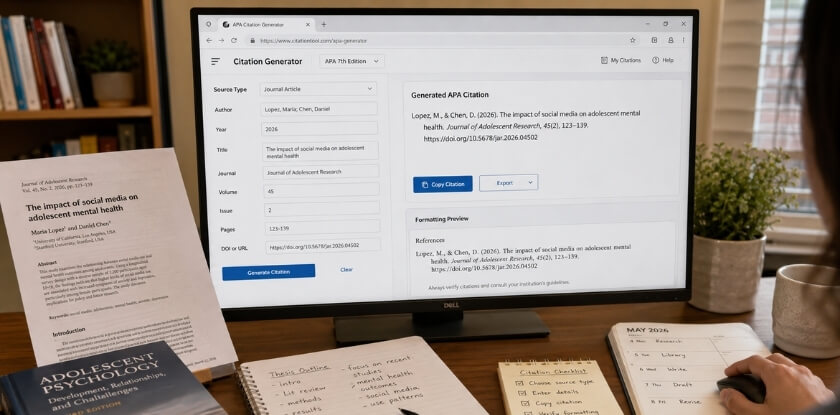
An APA citation generator is exactly what it sounds like: a tool that builds your citations for you based on the source details you plug in. Useful? Absolutely. Foolproof? Not even close.
Here’s the honest reality — these tools save time, but they also make errors. Regularly. If you blindly copy what a generator spits out without checking it against APA 7th Edition rules, you’ll likely end up with formatting mistakes in your Reference List. So the right way to use one is as a starting point, not a final answer.
Which Generators Actually Work
The most commonly used options are:
- Zotero — free, open-source, works as a browser extension and desktop app. It can pull metadata directly from a webpage or journal article, which cuts down a lot of manual entry.
- Citation Machine — browser-based, no download needed. It covers APA 7th Edition, though it occasionally bungles DOI formatting and author name order.
- MyBib — clean interface, handles most source types well. Free tier is solid for student use.
- Cite This For Me — fine for basic sources, but double-check anything with multiple authors or a corporate author.
Most university libraries also offer citation tools through their own databases — check there first if your institution provides access.
How to Use a Generator Without Getting Burned
Step 1: Identify your source type first. Journal article, book, webpage, Thesis Citation — each one has a different APA format. Selecting the wrong source type is the single most common mistake people make before they even start entering data.
Step 2: Enter the DOI or URL when available. A DOI (Digital Object Identifier) is more stable than a URL and preferred in APA Style for journal sources. If your source has one, use it. Most generators will auto-populate fields from the DOI, saving you from manual entry errors.
Step 3: Fill in any missing fields manually. Auto-population is convenient but unreliable. Check that the author’s name, publication year, article title, journal name, volume, issue, and page range are all present and correctly formatted. APA 7th Edition uses sentence case for article titles and title case for journal names — generators frequently get this wrong.
Step 4: Copy the output and then verify it. Don’t just paste it straight into your Reference Page. Look up the source type in the Publication Manual of the American Psychological Association or on the official APA Style website and compare the structure line by line.
What Generators Get Wrong Most Often
A few specific failure patterns show up constantly:
- ISBN vs. DOI confusion. Some generators include the ISBN in a reference where a DOI belongs, or skip the DOI entirely. For any journal article with a DOI, the DOI must appear at the end of the reference as a URL format:
https://doi.org/xxxxx. - Capitalization errors. Article titles in APA should follow sentence case (only the first word and proper nouns capitalized). Generators often return title case because that’s how the source displays it.
- Missing database information for theses. When you’re writing a Thesis Citation for an unpublished thesis or one retrieved from a database, the generator may omit the database name or format the institutional affiliation incorrectly.
- et al. thresholds. APA 7th Edition uses “et al.” from the first In-Text Citation when a source has three or more authors. Some generators still apply the old 6-author rule from earlier editions.
Generators and Plagiarism Prevention
Using a generator doesn’t protect you from plagiarism. Plagiarism Prevention depends on how and whether you cite sources — not which tool formats the citation. A perfectly formatted reference means nothing if you’ve paraphrased someone else’s work without citing it at all, or if you’ve cited the wrong source.
Academic Writing requires that your citations be accurate and honest. A generator just handles the mechanical formatting. The intellectual work — identifying what needs to be cited, matching citations to in-text references, ensuring your Reference List only includes sources you actually used — that’s still entirely on you.
Use generators to speed up formatting. Use your brain to catch what they miss.
Frequently Asked Questions (FAQ)
What’s the difference between APA 6th and 7th Edition?
APA 7th Edition, released in 2020, made several practical changes. The biggest ones: you can now list up to 20 authors in a Reference List entry before abbreviating (it used to be 6), the running head on every page is gone for student papers, and DOI formatting changed to a hyperlink style (https://doi.org/…). If your professor or journal hasn’t specified, default to 7th Edition. That’s the current standard.
Do I need a DOI for every source?
No. A DOI (Digital Object Identifier) is required when one exists for a journal article or other digital source — don’t leave it off if it’s there. But plenty of sources don’t have DOIs. Books, websites, and older print articles often won’t have one. In those cases, use a URL if the source is online, or nothing at all if it’s a print-only source.
Is a Bibliography the same as a Reference Page in APA?
Not quite. A Reference Page in APA Style lists only the sources you actually cited in your paper. A Bibliography can include background reading you consulted but didn’t directly cite. APA uses the Reference Page format. If you see “Bibliography” in APA guidelines, it typically means the same thing — but technically they’re different concepts. Stick with “References” as your page heading.
How do I cite a source with no author?
Move the title to the author position. Italicize it if it’s a standalone work (like a book or report). If it’s an article title, put it in regular font with quotation marks. Your In-Text Citation then uses a shortened version of that title in place of an author name.
Can I use an APA Citation Generator for academic submissions?
Yes, but verify everything it produces. APA Citation Generators are useful for getting the structure right quickly, but they make mistakes — wrong punctuation, missing DOIs, incorrectly formatted author names. Treat the output as a first draft, not a finished citation. Run it against the Publication Manual of the American Psychological Association or your institution’s APA guide before submitting.
How do I format a Title Page in APA 7th Edition?
Student papers and professional papers have slightly different requirements. For a student paper, include the paper title (bold, centered), your name, institution name, course number and name, instructor name, and due date. No running head needed. Professional papers (submitted for publication) still require a running head. Double-space the whole page, and use the same font as the rest of the document.
Does APA require an Abstract?
Not always. Many student papers don’t need one unless the assignment specifically asks for it. Professional papers and journal submissions almost always require an Abstract — typically 150 to 250 words, no indentation on the first line, and no citations inside it. Check your assignment instructions first.
How do I cite a thesis or dissertation in APA?
The format depends on where you found it. For a published thesis from a database like ProQuest:
Author, A. A. (Year). Title of thesis [Doctoral dissertation, University Name]. Database Name. URL
If it’s unpublished, replace the database name and URL with “[Unpublished doctoral dissertation]” and the institution name. A Thesis Citation in APA follows the same logic as most other source types — author, date, title, source.
What’s the correct way to handle an ISBN in APA citations?
You don’t include an ISBN in APA citations at all. APA 7th Edition doesn’t require it. Publishers and librarians use ISBN internally, but it has no place in your Reference List. Use the DOI for digital books when available, or just the publisher information for print books.
How does APA help prevent plagiarism?
Consistent In-Text Citations and a complete Reference List make it clear exactly which ideas came from external sources and which are your own. That transparency is the core mechanism for Plagiarism Prevention in Academic Writing. It’s not just about avoiding penalties — it gives appropriate credit to the researchers whose work you’re building on. Every paraphrase needs a citation, not just direct quotes. That’s the part people most often get wrong.
My professor asked for “APA format” but didn’t specify the edition. Which one do I use?
Use APA 7th Edition. It’s been the current edition since 2019. Unless your institution has a specific policy still requiring 6th Edition (some do, temporarily), 7th is the default assumption in academic writing as of 2024.
Conclusion — Next Steps to Mastering APA
APA Style isn’t something you learn once and forget. It’s a skill you build over time, getting faster and more confident with each paper you write.
If you’ve read through this guide, you already know more than most students do when they sit down to format their first reference list. That matters. Knowing why the rules exist — not just what they are — means you can reason your way through edge cases instead of panicking.
Here’s what to focus on next.
Start with the Basics, Then Add Layers
Get comfortable with the four formatting pillars first: the Title Page, the Abstract, in-text citations, and the Reference Page. Don’t try to memorize every rule at once. Most academic papers use maybe a dozen citation types repeatedly — journal articles with a DOI, books with an ISBN, websites with a URL, and the occasional thesis citation. Master those, and you’ll handle 90% of what you’ll actually encounter.
Keep the Publication Manual Close
The Publication Manual of the American Psychological Association (7th edition) is still the authoritative source. Yes, it’s dense. But the index is genuinely useful, and once you know how it’s organized, finding answers takes under a minute. A used copy costs almost nothing.
If buying it isn’t practical, the official APA Style website (apastyle.apa.org) covers the same ground for free. Bookmark it. Use it before you use any random citation guide you find through a search engine.
Use an APA Citation Generator — But Check Its Output
APA Citation Generator tools save real time. Zotero, Citation Machine, and the built-in citation tools in Google Docs and Microsoft Word are all decent. None of them are perfect. Automated tools misread author names, drop DOIs, and occasionally format edition numbers wrong.
Every generated citation needs a quick human check against the APA 7th Edition rules. Five seconds of verification prevents a formatting error from undermining work you spent weeks on.
Plagiarism Prevention Is Bigger Than Quotation Marks
Proper citation is your primary defense against accidental plagiarism. If an idea came from somewhere else, it needs a citation — paraphrased or quoted, doesn’t matter. A full and accurate Reference List also lets your readers trace your sources, which is part of what makes academic writing credible in the first place.
Don’t just cite to satisfy a requirement. Cite because it’s honest.
Build a Personal Reference Checklist
After your next paper, write down the three citation types you found most confusing. Look them up properly. Write out the correct format by hand. This sounds tedious, and it slightly is — but it works. Two or three papers later, those formats will be automatic.
APA 7th Edition simplified a lot compared to earlier versions. Running headers are only required for manuscripts submitted for publication, not student papers. The rules around URLs became cleaner. Inclusive language guidelines were updated. If you learned APA from an older source, skim the 7th edition changes — some of what you think you know may be outdated.
One Last Thing
The goal of APA formatting isn’t perfection for its own sake. It’s consistency. A reader should be able to move through your paper and your Reference List without friction, finding exactly what they need to evaluate your work.
You already have the foundation. Now write the paper.
