
A badge that is too small cuts off half of someone’s name. One that is too big flops around on a lanyard and annoys everybody by the second coffee break. The size is a five-minute decision that gets expensive once 500 badges are printed.
Quick answer: The most common conference badge size is 4×3 inches (about 102 × 76 mm), printed horizontally, because that size fits standard badge holders and lanyards. Events with tracks or QR codes often move to A6 (105 × 148 mm) or 4×6 inches, and small community or school events use A7 (74 × 105 mm). Plastic ID-style cards follow CR80 (85.6 × 54 mm). No official standard sets event badge sizes, so match the size to your holder and printer before you print.
Last verified against official sources: October 2026.
What Is the Standard Size for a Conference Badge?
The standard is 4×3 inches (about 102 × 76 mm), printed with the long edge across the top. You see it at professional conferences, corporate summits, trade expos and multi-track events of almost any scale. It gives you enough room for a readable name, job title, company and a logo without looking cluttered.
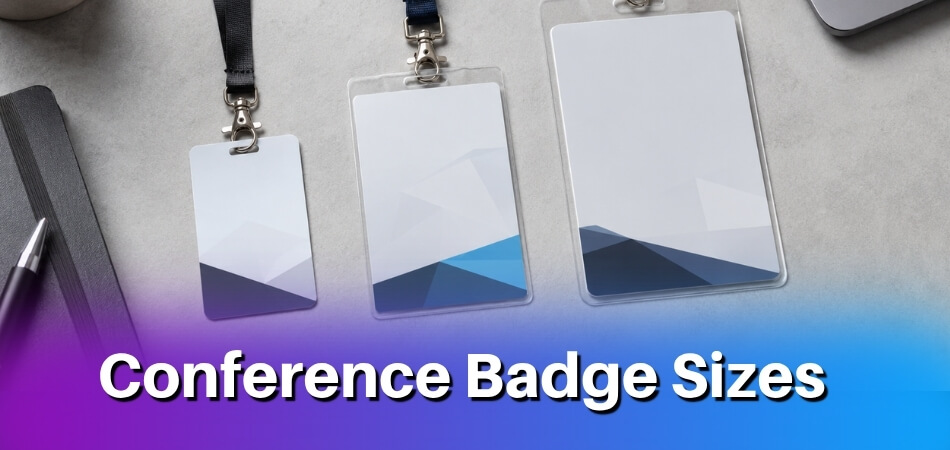
A 4×3 badge also fits cleanly into standard badge holders and most lanyard clip systems, including the notch type where you punch a hole at the top center. That compatibility matters when you order supplies from several vendors or reuse holders from a previous event.
Portrait or Horizontal?
A 3×4 portrait badge is the same card turned on its side. Some corporate organizers prefer portrait to match a vertical design system. Either way, check that your holder opens on the right edge for the orientation you chose.
What About the CR80 Card Size?
CR80 is the trade name for the credit-card size used for plastic ID cards and RFID cards. It follows the ISO/IEC 7810 ID-1 format (the standard is in its fourth edition, published December 2019): 85.60 × 53.98 mm, which works out to about 3.37 × 2.125 inches (many suppliers round the width to 3.375 inches). It is much smaller than a 4×3 paper badge, so it suits access cards and staff IDs better than a name badge people must read from a distance.
Is There an Official Standard for Event Badges?
No. Printers, suppliers and holder makers set event badge sizes, not a standards body. The nearest formal standard, ISO/IEC 7810, is about plastic ID cards. Even the printer guides differ beyond 4×3. Paperlust, an Australian printer, lists 102 × 76 mm as the conference insert and 102 × 152 mm as the large option, while GrowthZone (January 2026) says a badge should be at least 4×6 inches. The safe step is to ask your holder supplier for the exact insert size.
Badge Size Comparison at a Glance (Side-by-Side Chart)
These are the formats printers list most often, from adhesive tags for small events to larger badges for multi-track summits and expos.
| Size | Dimensions | Best For | Holder Fit |
| CR80 card | 85.6 × 54 mm (3.37 × 2.125 in) | Plastic access cards, staff IDs, RFID cards | Card holders, not name-badge holders |
| A7 | 74 × 105 mm (2.9 × 4.1 in) | Small community events, children’s events, school events | A7 holders, which can be harder to find and may need a special order |
| 4×3 inch (or 3×4 portrait) | 102 × 76 mm | Professional and corporate conferences, standard lanyards, name card inserts | Most universal holders, the usual default |
| A6 | 105 × 148 mm (4.1 × 5.8 in) | Multi-track summits, expos, events with a printed schedule on the badge | A6 holders; availability varies by region, so confirm stock |
| 4×6 inch (portrait) or 6×4 (horizontal) | 102 × 152 mm | Passes with a QR code or schedule, expos, trade shows (some expos go to A5) | Needs a larger holder than the 4×3 one |
| Compact name card | 89 × 50 mm (3.5 × 2 in) | Networking events and trade shows (size listed by Paperlust) | Needs a holder made for this insert size |
| Adhesive event tag | 76 × 51 mm (3 × 2 in) | One-day events, meetups and workshops (size listed by Paperlust) | No holder or lanyard |
What the Size Differences Mean in Practice
The 4×3 badge hangs well on a lanyard without flopping and leaves space for a name, title, company and a QR code. A6 is noticeably bigger: if attendees should carry their session schedule on the badge, that extra space earns its keep, and expos use it where visibility across a crowded floor matters. A7 sits at the other end. It is practical for children’s and school events where a large badge feels awkward on a small person, but the print area is tight, so you fit a name and maybe one line of context.
A6 is slightly harder to fit in a standard holder without custom sizing, so confirm holder stock before you commit.
Which Size for Which Event: Professional vs Casual
Use 4×3 for professional and corporate events, A7 or stick-on labels for casual and children’s events, and A6 or larger when the badge must carry a lot of information. The right size depends on the event type, who attends and how much has to be readable at a glance.
Professional and Corporate Conferences
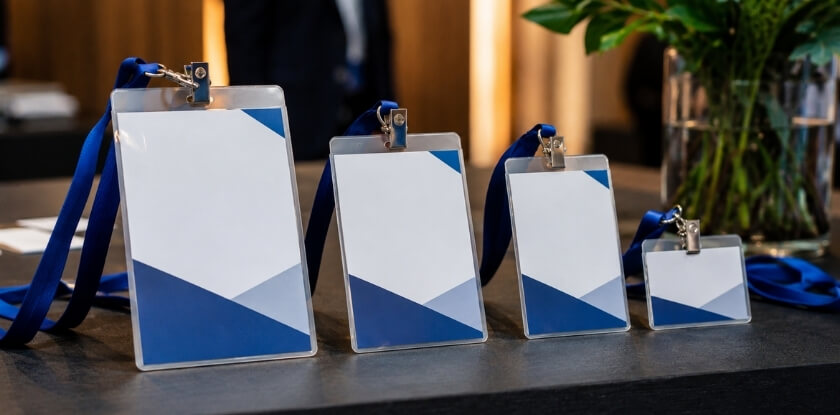
Professional events tend to use the 4×3 badge, which 4over4 calls the most popular size. There is room for a readable name, job title, company and any session-tier indicator. Attendees scan each other’s badges quickly in hallway conversations, so readability at arm’s length matters more than visual novelty.
Holders and lanyards are expected, and holders sold in bulk are widely made for this size, so you are unlikely to need a custom order. If the logo is part of the design, supply it as a vector or high-resolution file.
Casual, Community, School and Children’s Events
Smaller events have more flexibility. A7 name cards (printed on lighter stock, sometimes laminated for durability) in a basic holder are a low-cost setup, and A6 works where you want something visible without spending much on printing.
For children’s events, size and safety both count. Stick-on name labels need no lanyard, which removes a safety concern for younger kids. Paperlust lists 76 × 51 mm (3 × 2 in) adhesive tags for one-day events, meetups and workshops, and a larger label gives room for more text. Use pre-cut badge label paper in a basic desktop printer, or print on standard label sheets and cut them down. If you do use lanyards, pick short ones with a breakaway clip and a compact badge so it does not hang too low.
Colour and format are looser here. Bright designs with large first-name-only text keep things friendly and easy to read. There is no strict bleed rule for casual events, and images at 150 DPI avoid obvious pixelation. These badges often skip the holder and go straight onto a shirt with an adhesive backing.
Large Multi-Track Summits and Expos
Attendees at summits and expos often need more on the badge: session tracks, access tiers, sponsor logos, QR codes for check-in and sometimes meal or networking indicators. A 4×3 badge can still work, but only with a tight, well-planned layout. Many larger expos print on A6, sometimes horizontally, and badges that double as a credential or access pass with printed zones sometimes go as large as A5. Expos may also print booth numbers or exhibitor categories, and hybrid events with QR-heavy designs often push organizers toward A6.
QR codes are increasingly standard at expos, and they take real space, so factor one into the layout before you settle on a size.
How Content Volume Affects Your Badge Size Decision
The more you print on a badge, the larger it needs to be, because the size you choose must keep every element readable. A good size is not just one that looks proportional.
When a Standard 4×3 Inch Badge Is Enough
A 4×3 badge handles a full name, a job title, a company name and a logo, which is a typical professional badge. Add a QR code, a color-coded track indicator, a social handle or a pronoun line and things get tight, so the type shrinks and becomes hard to read at arm’s length.
When You Need to Step Up to a Larger Size
Multiple tracks or roles. If the badge must tell speakers, sponsors, press and general attendees apart, you need either a larger badge or a very disciplined design. A 4×3 badge can carry one color band or a role label, such as the speaker, sponsor or press badge types. Fitting both a color-coded track and a role label next to name and title gets messy fast.
QR codes. The printer 4over4 advises a QR code of at least 0.75 × 0.75 inches, with a blank border around it, so phone cameras read it reliably. Dense codes and poor lighting need more room, so test the printed badge with several phones. On a 4×3 badge that block plus its border takes a real share of the face. If the code is required, consider A6, which lets you separate the scan zone from the name.
Children’s and school events. These often need emergency contact details or allergy information on the badge. That much text calls for A6 or a custom horizontal format and a clear visual hierarchy.
Fitting Content to Size: Practical Thresholds
These are not hard rules, only what tends to work in practice.
| Content Elements | Recommended Badge Size |
| Name, title, company, logo | 4×3 inch or A7 |
| Above + QR code | 4×3 inch (tight) or A6 |
| Above + track color + role label | A6 or larger |
| Above + emergency/contact info | A6 or custom horizontal |
The Badge Holder Factor
The holder trims your usable area. A standard holder can cover a few millimetres at the top where the lanyard or clip attaches, and some hide the bottom edge slightly depending on how the badge sits. If your event name or a QR code lands in that zone, it gets hidden or bent. Notch type holders also punch through the badge itself, so leave a clear zone at the top where a punch or slot will not cut through text or a barcode.
Test a physical proof in the actual holder before printing a full run. What looks fine on screen can shift once the badge hangs on a lanyard at a slight angle.
Keeping the Design Scannable
Attendees glance at a badge only briefly while networking. If the name is not the most dominant element, the badge is not doing its job, even on a larger format.
Prioritize. Name first and largest, title and company second, everything else smaller or lower.
Match type size to reading distance. Sources assume different distances, so their numbers differ. Paperlust suggests a first name of 36 pt or larger on a 102 × 76 mm insert, with the surname at 18 to 24 pt, the organisation at 12 to 14 pt and the role at 10 to 12 pt, and treats 10 pt as the minimum for any text. GrowthZone (January 2026) recommends a first name of at least 72 pt so it reads from 15 feet, which only suits a larger badge. Whichever you choose, print one at actual size, wear it at a realistic height and read it from about two metres, including with someone who wears glasses.
If the content still does not fit an A6 at readable sizes, split it across front and back, give attendees a lanyard insert card for schedule details, or ask which fields really need to be on the badge.
Badge Size and Printing: A Practical How-To
Set the file up at the exact finished size with 3 mm bleed, a safe margin and 300 DPI, then choose stock and a printer that suit that size. If the setup, material or printer is off, you end up with blurry text, clipped edges or badges that jam on the day.

How to Set Your Print Size Correctly (Bleed, Margin, and Resolution)
Start the document at the exact finished size, whether that is 4×3 inches, A6 or A7, in CMYK colour as 4over4 asks. Do not design at another size and scale it later.
- Bleed. Add 0.125 inches (3 mm) on all four sides, which matches the 1/8 inch 4over4 asks for on event badges. Printers differ, so use your printer’s template if it gives different values. A 4×3 badge then needs a canvas of about 4.25 × 3.25 inches, and an A6 follows the same logic on a larger canvas. Backgrounds or images that run to the edge must extend into the bleed, or you get a thin white strip after cutting.
- Margin. Keep text and logos at least 3 mm inside the finished edge (4over4 also gives 1/8 inch), and 5 mm if you want to be safe. Close to the trim line, even a small cutting variance slices into a name.
- Resolution. Export at 300 DPI minimum at every size. A 72 DPI file stretched to fill an A6 prints soft, especially small job titles and QR codes. Replace a logo pulled from a website with the vector or high-resolution version.
Most print vendors supply templates with all three guides already set. If you build from scratch in Illustrator, InDesign or Canva, include the bleed in the document size from the start rather than adding it at export.
If you print in advance on an office laser printer, set the dialog to “actual size” instead of “fit to page”. Fit to page quietly scales the design, and the badges come out slightly smaller than intended.
Paper Stock and Material Options
Stock affects how a badge looks, feels and holds up after a day of being worn, grabbed and pushed back into a holder.
- Standard matte card (250 to 300 gsm) is the usual choice for one-time conference badges. It prints cleanly, cuts well and runs in most desktop printers. For a full day or more, 300 gsm is a reliable default, and larger badges like A6 benefit from the heavier end because they curl more in a holder.
- Lighter card (about 170 to 200 gsm) keeps costs down for short events with no noticeable drop in quality. A laminated print on 200 gsm also works for a shorter corporate event.
- Gloss coated card makes colors pop but can glare under fluorescent lighting, which makes names harder to read from a distance. Ask for uncoated stock if attendees should be able to write on the badge.
- Synthetic or PVC card is durable and waterproof, which helps at outdoor expos or multi-day events. It usually has to go to a commercial printer.
- Plain paper (90 to 120 gsm) suits a half-day meetup or school event where badges are disposable. It is cheap and fast but wrinkles easily in a warm room.
Printer Compatibility: Zebra ZD621 and Brother QL-1110NWB
On-site badge printing at the registration desk, where volunteers may check names and hand out badges, is one option for events with late sign-ups. Two examples are the Zebra ZD621 and the Brother QL-1110NWB. Both have a print width of about 4 inches, which is why 4×3 is such an easy fit and A6 can be a problem.
Zebra ZD621. This desktop thermal printer uses direct thermal or thermal transfer media, so there are no ink cartridges. Zebra lists a maximum print width of 104 mm (4.09 inches) at 203 dpi on the standard 4-inch model. A 4×3 badge fits, and so does a 4×6 badge printed in portrait (101.6 mm on the short side), but an A6 (105 mm on the short side) does not fit the 203 dpi model. Zebra lists 108 mm for its optional 300 dpi version, so confirm the exact model before you plan around A6. Connection options depend on the configuration, so check the spec sheet for USB, Ethernet, Wi-Fi or Bluetooth, and check that your registration platform supports it.
Brother QL-1110NWB. This wide-format label printer handles continuous rolls and die-cut labels, with a maximum print width of 4 inches (101.6 mm). Brother’s specifications say full-width printing may not always be possible depending on the environment and advise leaving extra margin in the design. A full 4-inch badge uses all of that width, so test before the event. It offers USB, Ethernet, Wi-Fi and Bluetooth.
Thermal output is mostly black on white, so full-color logos or colored backgrounds are a poor fit. The usual workaround is full-color pre-printed shells, with the thermal printer adding the name label on the day. Whatever the printer, confirm the current specifications on the maker’s site before you buy.
Badge Holders, Notch Types, and Lanyard Compatibility
The holder and the lanyard must match the badge size, so choose them together with the print size. The holder, the lanyard attachment and the notch all depend on getting the physical size right from the start.

Badge Holders
Holders are made for specific badge dimensions, so a mismatch means the badge floats around inside or will not fit at all. The most widely sold holder is for the 4×3 badge. A6 holders (148 × 105 mm) follow the ISO paper series used outside North America, so check local stock, and A7 holders can be harder to find and may need a special order.
Most rigid holders have a slot, clip or bar attachment along the top. Vinyl soft sleeves are more forgiving about size but look less polished at professional events. Confirm the holder dimensions before you finalize the template, because the holder’s border covers part of the printed area. For multi-day events on busy floors, heavier-gauge holders with reinforced notch loops last better than flimsy ones that crack or lose a clip.
Notch Types and Placement
A notch is a small punched hole or slot at the top of the badge for a lanyard clip or ring. Slot punch, oval punch and single hole are the usual types, normally centered at the top. On a horizontal 4×3 badge the notch sits on the 4-inch top edge, on a portrait 3×4 on the 3-inch edge, and on a portrait A6 on the 105 mm edge. Before you print 500, confirm that pre-punched stock or holders with a built-in slot match your intended orientation.
Some expos and multi-track summits use a dual notch at the two top corners, so a badge that also holds session tickets or sponsor strips hangs more rigidly.
Leave a clear zone at the top edge, so no logo, job title or color band sits where the hole will be punched. A punched hole through a sponsor logo is an easy mistake when bleed and margin were set without the notch zone in mind.
A pre-cut holder slot works for softer paper but can tear over a full day with heavy card. With 300 gsm or thicker material, a reinforced notch or a grommet is worth the extra step.
Lanyard Compatibility
Standard lanyards with a swivel or bulldog clip suit badges roughly 3 to 4 inches wide, so a 4×3 badge in a rigid holder sits well on them. Very small badges such as A7 or a business-card-sized name card look awkward on a full-width lanyard and tend to spin or flip.
If you use retractable badge reels, common at corporate conferences where people scan their badge often, confirm that the reel clip fits your holder. Most reels attach to a reinforced hole, not a simple notch.
Keeping the Badge From Flipping
A badge that spins shows its blank back. GrowthZone (January 2026) advises that badges should not flip or spin and, where possible, should be double-sided with the same information on both sides. Hang a proof on a lanyard and walk around with it before you print the full run, especially with larger sizes such as A6.
Cost Differences by Badge Size
Larger badges cost more per unit, mainly through material, sheet yield and holders, though run size and print method change the picture just as much. Across 500 or 1,000 badges the differences add up fast. This section gives no price list, because prices vary widely by supplier, region and volume.

Paper Stock and Material Costs
A 4×3 badge on 300 gsm card uses less material than an A6, so it costs less per unit. For large runs, printers often quote by sheet yield, meaning how many badges fit on one A3 or SRA3 sheet. A slightly bigger badge can lower the yield and push you into a higher bracket.
Tyvek and synthetic materials are priced by area, so bigger badges cost more. PVC costs well above card at any size, and the gap between a 3×4 and an A6 in PVC is proportionally larger than with paper.
Print Runs and Setup Fees
Short runs are where size costs bite hardest. For 50 badges, a digital print shop often charges a flat setup fee whatever the size, which favors smaller badges at low quantities. At 300 or more, the per-unit gap between 3×4 and A6 tends to narrow.
On-demand printing with a label printer changes the model: you pay for label stock by the roll, so the question becomes how many badges one roll yields at your size. A6 uses up a roll faster than 3×4, which adds up for a multi-track summit with 800 attendees.
Badge Holders and Lanyards
People forget this cost when comparing sizes. Holders are not interchangeable, so switching from 4×3 to A6 mid-planning makes your existing holder stock useless. Rigid A6 holders generally cost more per unit than those for 4×3 because they are less common and ordered in smaller volumes. Lanyard cost does not change with badge size, but the holder’s notch type decides which lanyards fit, and A6 holders are more often sold with a top-center notch.
Size-Cost Summary
| Size | Cost Pattern | Watch Out For |
| A7 | Usually the cheapest per badge | Little room for content; holders may be special order |
| 4×3 inch | Mid-range, with the widest choice of holders | Gets tight once you add a QR code and role label |
| A6 | More material, more roll use, pricier holders | May not fit 4-inch label printers |
| PVC or synthetic, any size | Costs well above card | Usually needs a commercial printer |
Always get a quote from your print vendor using your actual specifications, including bleed, margin and resolution, since shops factor those into material waste.
If budget is tight, A7 works for casual and children’s events that only need a name and a color-coded role. For a professional conference whose badge carries a QR code, company, job title and session track, the A6 premium is usually justified by the usability you gain.
Badge Size for Virtual and Hybrid Events
Virtual events have no physical badge, so the size is a digital name card sized to the platform, while hybrid events need both a physical badge and an on-screen asset. MS International events are in person only, so this section is general guidance.
Virtual-Only Events
In a purely virtual conference the badge becomes a name card shown on screen, such as a video-call nameplate, a background overlay or a downloadable graphic attendees share on social channels. Overlays are commonly designed at a 16:9 ratio (for example 1920×1080 px), but a square or 4:3 ratio also works for name card overlays, so check what your platform expects. Downloadable graphics should be saved at a higher resolution so they stay sharp when re-uploaded.
Content is more constrained than on paper. A screen overlay has room for a name and maybe one line before text becomes unreadable in a video thumbnail.
Hybrid Events
- In-person side. Use standard physical sizing, 4×3 for professional events or A6 as an alternative where A-series sizes are the norm, and check the badge fits the holders you order. Keep one badge size for everyone at the venue, because mixed sizes cause trouble at registration and look inconsistent on camera.
- Virtual side. Build a separate on-screen asset. Some platforms generate one from registration data, but quality varies, so make a template by hand if your brand standards matter.
- QR codes. A printed code, sized as described above, works for session check-in or lead retrieval. On a virtual badge it is almost never scannable from another person’s camera, so ask whether it serves a purpose.
The print specs for the physical badge are the same as for any event. For large hybrid events with late registrations, printing on demand at the desk is worth prioritizing over pre-printed batches.
From our experience at MS International: Our conferences are held in person in the Greater Toronto Area, and speakers collect their conference badge at check-in. Arrive at the check-in time stated in your confirmation email. Our pages do not publish a badge size, so the sizes in this guide are general industry formats and not a description of our own badges.
FAQ: Conference Badge Sizes
Ordering or printing badges? Comparing the 4×3 inch format with A6, A7 and CR80, bleed and resolution settings, paper stock and office printers are the specifics here.
What is the most common conference badge size?
The 4×3 inch badge (about 102 × 76 mm). The printer 4over4 calls it the most popular size because it is large enough for readable names and small enough to wear on a lanyard all day. No official standard exists, so confirm your holder size.
Is a 4×3 inch badge the same as A6 or A7?
No. A6 is about 4.1 × 5.8 inches and A7 about 2.9 × 4.1 inches. The 4×3 inch format is an inch-based size common in North America and does not match either A-series size exactly, so check dimensions when you source holders abroad.
What size is a CR80 badge?
CR80 is 85.6 × 54 mm (about 3.37 × 2.125 inches), the same credit-card size as the ISO/IEC 7810 ID-1 standard. It suits plastic access cards, not large printed name badges.
Can I print conference badges on a regular office printer?
You can, but results are inconsistent. Office printers are not built for badge card weights, and bleed handling is often poor. A label printer like the Zebra ZD621 or Brother QL-1110NWB gives sharper, more reliable output for on-demand printing at the event.
What resolution, bleed and margin should badge artwork use?
Use 300 DPI, 0.125 inch (3 mm) bleed on all sides, and keep names and logos at least 3 to 5 mm inside the trim edge. Printers differ, so follow your printer’s template. Lower resolution looks soft, and text near the edge can be clipped.
What paper stock works best for conference badges?
For full-day or multi-day events, 300 gsm matte card is a reliable default. Shorter or casual events can use lighter stock, and laminating adds durability and a cleaner look at a higher per-unit cost.
Is there an official standard size for conference badges?
No. Printers and holder makers set event badge sizes, and 4×3 inches (102 × 76 mm) is the format 4over4 names as the most popular. The ISO card standard only covers sizes like CR80.
Will a 4×3 inch badge fit a standard lanyard and badge holder?
Yes, with a notch or slot at the top. Most holders are designed around this size, but confirm whether yours uses a top slot, a side slot or a bulldog clip, since that decides where the notch goes and what content near the top gets covered.
What size should I use for a children’s or school event?
A7 or a similar small format works well, or a stick-on label with no lanyard at all. The badge sits better on a smaller frame, and there is usually less to display. If you use a lanyard, choose a short one with a breakaway clip.
Do virtual events need physical badge specifications?
No. For a virtual event the badge is a digital name card sized for the platform’s display, such as 1920×1080 px for many overlays. Resolution still matters, but bleed and paper stock do not apply.
What is the cheapest way to print conference badges without sacrificing quality?
If your headcount is fixed, order in bulk from a commercial printer, since per-unit cost drops with quantity and quality is more consistent. Printing on demand with a desktop thermal printer makes more sense when the attendee list changes up to the last minute.
Picking Your Badge Size
For a professional conference, the 4×3 inch badge does the job. Smaller events can use A7, and anything with several tracks, roles or session details probably needs A6 or larger. Set bleed and margins correctly, check the holder dimensions, and test one proof on a lanyard before you order 500 of anything.